Good news for employers: the PERKESO LINDUNG 24 JAM (SKBBK) contribution is no longer compulsory. Following a recent Cabinet announcement, it has changed from a mandatory contribution to a voluntary one.
This means employees now have a choice. If an employee does not want to join the SKBBK scheme, you can simply exclude them from the contribution in AutoCount HRMS. Foreign employees remain compulsory.
Here’s a simple, step-by-step guide on how to do it.
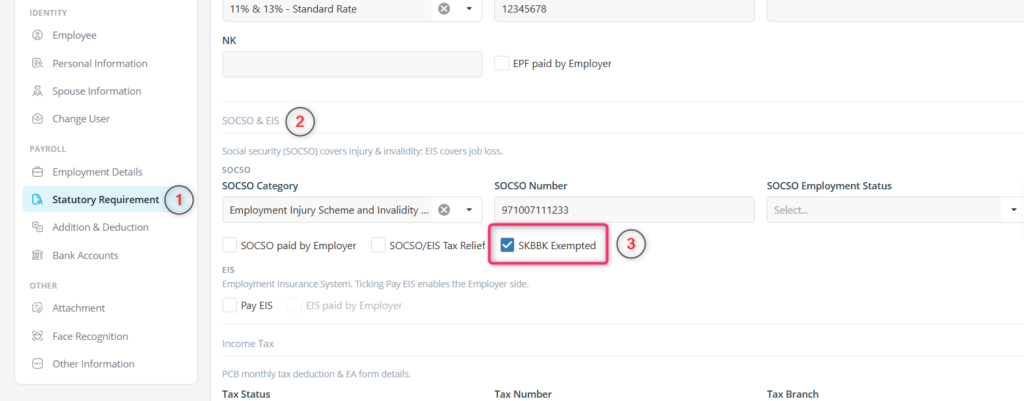
Step-by-Step: How to Exclude an Employee from SKBBK
Follow these 5 easy steps:
- Go to Employee Maintenance
- Select the employee you want to update
- Click on Statutory Requirement
- Under the SOCSO & EIS section, tick the box “SKBBK Exempted”
- Save the employee record
That’s it — no complicated setup needed.
What Happens After You Tick “SKBBK Exempted”?
Once this box is ticked and saved, AutoCount HRMS will:
- Automatically remove SKBBK from that employee’s SOCSO calculation
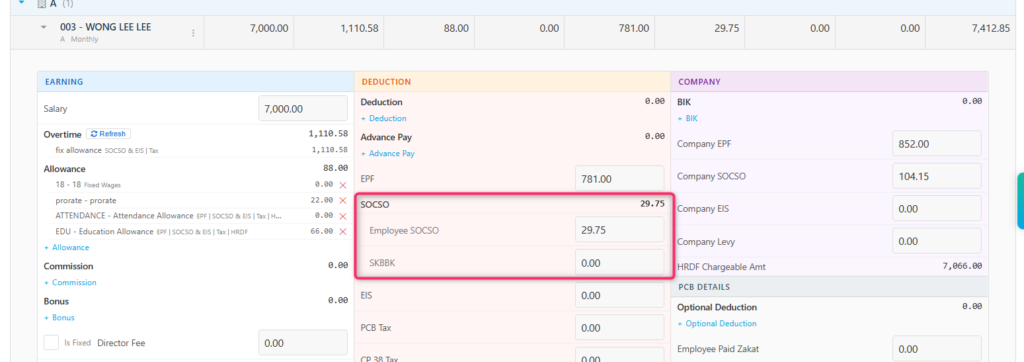
- Make sure no SKBBK deduction appears when you run payroll for that employee
You can see this reflected clearly in the payroll breakdown — the SKBBK line will show RM 0.00 for exempted employees.
Important: Only Apply This With Employee Consent
Before ticking “SKBBK Exempted,” make sure:
- The employee has clearly chosen not to participate in the SKBBK scheme
- The exclusion follows your company’s internal policy
- You have the employee’s consent on record
This setting should only be applied for employees who genuinely opted out — not applied by default for everyone.