Cloud Accounting Software for Malaysian Businesses
Accounting in the Cloud - Anywhere, Anytime
AutoCount Cloud Accounting empowers you with secure, real-time access to your business finances - no installation required
Smart Solutions for Your Business
AutoCount Cloud Accounting is online accounting software for Malaysian businesses. Create quotations and invoices, record purchases, reconcile bank transactions, track inventory on eligible plans, and manage e-Invoices in one cloud system. Compare plans or start a free account.
Search TIN at Tax Entity
It allows suppliers to easily obtain a customer’s TIN using their Business Registration Number (for businesses) or Identity Card Number (for MyKAD holders).
Upload Taxpayer's QR Code
Ask the customer for their QR code from MyInvois portal. Just upload it in AutoCount Cloud Accounting and their Tax Entity details will be auto-filled.
Import Transactions and Master Data
Easily import transactions like Quotations, Invoices, Purchase Orders, and Cash Book Entries, as well as master data such as Customers, Suppliers, and Products.
File Attachment
You can now attach files (PDF, Word, Excel, etc.) to Invoices, Purchase Invoices, Receipts, and Payments for easy tracking.
Recurring Function
The recurring transaction function in AutoCount Cloud Accounting automatically generates transactions for you once the recurring instructions are set up.
Document Scanner
Capture images of supplier invoices, bills, and receipts, and effortlessly convert them into transactions, saving time on manual entry.
Why AutoCount Cloud Accounting
Find the Right Plan
Compare our pricing options and choose the plan that best suits your business needs - whether you're just starting or expanding. Sign up for a 1-year plan and enjoy a 65% discount, or go with a 2-year plan to save 75% discount.
Lite
Start-up / Micro Company
-
2-user
1 user + 1 account user
-
Accounting
Cash Book Entry, Journal Entry, Knock Off Entry, Bank Reconciliation, Ledger, Journal of Transaction, Trial Balance, Profit and Loss Statement, Balance Sheet Statement, Debtor Aging, Creditor Aging, Debtor Statement and Creditor Statement. Auto Bank Reconciliation.
-
Sales
Quotation, Invoice, Credit Note. Printing of Sales Document (Quotation, Invoice, Credit Note)
-
Purchase
Purchase Order, Purchase Invoice, Purchase Return. Printing of Purchase Document (Purchase Order Only)
-
e-Invoice
Standard e-Invoice, Consolidated e-Invoice, Self-Billed e-Invoice
- "Get 65% Off with a 1-Year Subscription"
Basic
Professional Services
-
3-user
2 user + 1 account user
-
Accounting
Cash Book Entry, Journal Entry, Knock Off Entry, Bank Reconciliation, Ledger, Journal of Transaction, Trial Balance, Profit and Loss Statement, Balance Sheet Statement, Debtor Aging, Creditor Aging, Debtor Statement and Creditor Statement. Auto Bank Reconciliation.
-
Sales
Quotation, Invoice, Credit Note. Printing of Sales Document (Quotation, Invoice, Credit Note). Sales Report - Monthly Sales Analysis
-
Purchase
Purchase Order, Purchase Invoice, Purchase Return. Printing of Purchase Document. Purchase Report - Monthly Purchase Analysis
-
e-Invoice
Standard e-Invoice, Consolidated e-Invoice, Self-Billed e-Invoice
-
SST
Manages tax, tariff codes as well as processing SST-02 Return. Suitable for both Sales and Services tax with reporting features. Reports including Tax Transaction Listing, Tax Payment Collection, Outstanding Service Tax Listing etc.
-
Recurring Transaction
The recurring transactions function automates invoices, journal entries, and payment vouchers, saving time and ensuring accuracy. It streamlines recordkeeping and improves efficiency in managing recurring transactions.
- "Get 65% Off with a 1-Year Subscription"
Plus
Trading of products
-
4-user
3 user + 1 account user
-
Accounting
Cash Book Entry, Journal Entry, Knock Off Entry, Bank Reconciliation, Ledger, Journal of Transaction, Trial Balance, Profit and Loss Statement, Balance Sheet Statement, Debtor Aging, Creditor Aging, Debtor Statement and Creditor Statement. Auto Bank Reconciliation.
-
Sales
Quotation, Invoice, Credit Note. Printing of Sales Document (Quotation, Invoice, Credit Note). Sales Report - Monthly Sales Analysis
-
Purchase
Purchase Order, Purchase Invoice, Purchase Return. Printing of Purchase Document. Purchase Report - Monthly Purchase Analysis
-
e-Invoice
Standard e-Invoice, Consolidated e-Invoice, Self-Billed e-Invoice
-
SST
Manages tax, tariff codes as well as processing SST-02 Return. Suitable for both Sales and Services tax with reporting features. Reports including Tax Transaction Listing, Tax Payment Collection, Outstanding Service Tax Listing etc.
-
Recurring Transaction
The recurring transactions function automates invoices, journal entries, and payment vouchers, saving time and ensuring accuracy. It streamlines recordkeeping and improves efficiency in managing recurring transactions.
-
Inventory Control
Manages your inventory and costing for your business. Generates stock related reports such as Stock Balance and Stock Card. You can also classify your products through Product Category for reporting purpose. Track Product Variant.
-
Multi-Currency
Automatically tracks and converts foreign currency into local currency instantly. Foreign Invoices made simple through automatic exchange rate or you may even enter it manually.
-
Department
Running departments (Projects) in your company made easy. Allows you to record your costing, sales or even expenses by departments and able to generate departmental reports for top management.
- "Get 65% Off with a 1-Year Subscription"
Pro
Multi-warehouse
-
4-user
3 user + 1 account user
-
Accounting
Cash Book Entry, Journal Entry, Knock Off Entry, Bank Reconciliation, Ledger, Journal of Transaction, Trial Balance, Profit and Loss Statement, Balance Sheet Statement, Debtor Aging, Creditor Aging, Debtor Statement and Creditor Statement. Auto Bank Reconciliation.
-
Sales
Quotation, Invoice, Credit Note. Printing of Sales Document (Quotation, Invoice, Credit Note). Sales Report - Monthly Sales Analysis
-
Purchase
Purchase Order, Purchase Invoice, Purchase Return. Printing of Purchase Document. Purchase Report - Monthly Purchase Analysis
-
e-Invoice
Standard e-Invoice, Consolidated e-Invoice, Self-Billed e-Invoice
-
SST
Manages tax, tariff codes as well as processing SST-02 Return. Suitable for both Sales and Services tax with reporting features. Reports including Tax Transaction Listing, Tax Payment Collection, Outstanding Service Tax Listing etc.
-
Recurring Transaction
The recurring transactions function automates invoices, journal entries, and payment vouchers, saving time and ensuring accuracy. It streamlines recordkeeping and improves efficiency in managing recurring transactions.
-
Inventory Control
Manages your inventory and costing for your business. Generates stock related reports such as Stock Balance and Stock Card. You can also classify your products through Product Category for reporting purpose. Track Product Variant.
-
Multi-Currency
Automatically tracks and converts foreign currency into local currency instantly. Foreign Invoices made simple through automatic exchange rate or you may even enter it manually.
-
Department
Running departments (Projects) in your company made easy. Allows you to record your costing, sales or even expenses by departments and able to generate departmental reports for top management.
-
Multi-Location
Multi-Location module helps to manage your inventory, sales and purchases throughout different locations. Able to produce location-based reports to track inventory by each location if required.
-
Customize Financial Report Layout
Customize Financial Report Layout allows user to customize and organise financial report (Profit and Loss Statement and Balance Sheet) presentation based on available account types.
- "Get 65% Off with a 1-Year Subscription"
Manage Everyday Accounting in One Cloud System
AutoCount Cloud Accounting helps Malaysian businesses record sales and purchases, track payments, manage accounts, and review financial reports online. Your team and accountant can access the same company data, based on their user access.
Existing AutoCount Cloud Accounting User
If you have been using or are currently using AutoCount Cloud, click link to directly set up your free account.
New to AutoCount Cloud Accounting?
Not sure where to begin? Click link for a step-by-step guide to creating your FREE cloud account.
Frequently Asked Questions
Find answers to common questions about AutoCount Cloud Accounting, including how it works, key features, cloud vs desktop comparison, data security, and how to choose the right accounting system for your business.
Can my accountant access my AutoCount Cloud account?
What features does it include?
What is the difference between AutoCount Cloud Accounting and AutoCount Accounting?
Does AutoCount Cloud support SST?
Can I use AutoCount Cloud to submit e-Invoices to MyInvois?
Can I import my existing customer, supplier, and product records?
Blogs
Our articles explain AutoCount Cloud features, Malaysian e-Invoice requirements, SST, bookkeeping workflows, and how to choose the right accounting setup for your business. Explore guides written for Malaysian start-ups, SMEs, accountants, and growing businesses. Each article aims to answer common questions clearly, with links to relevant product features and official sources where applicable.
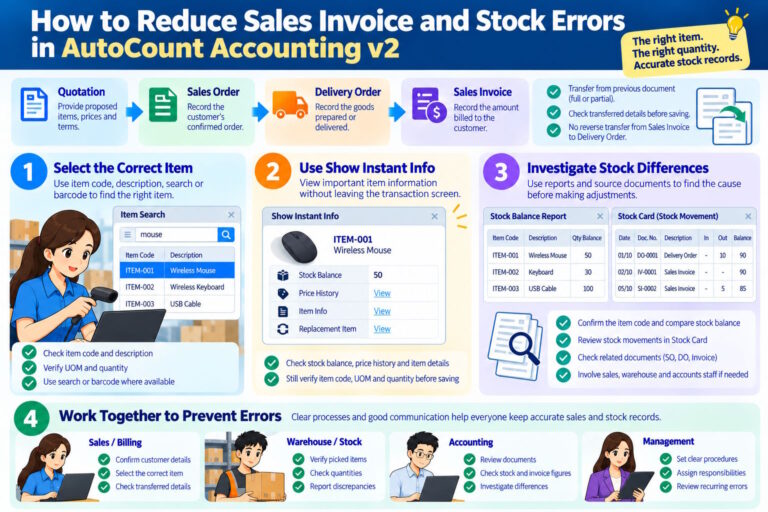
Sales invoice and stock errors can affect customer orders, inventory records and accounting work...
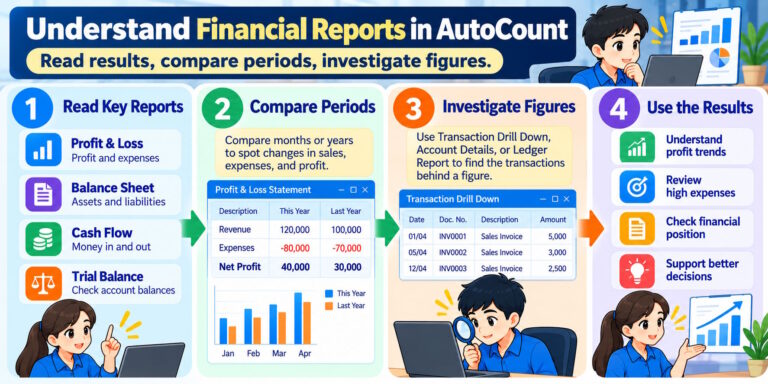
Financial reports help business owners, accountants and managers understand how a business is...
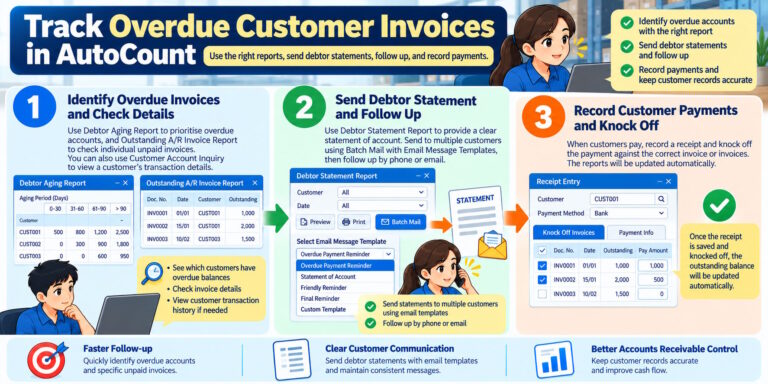
Late customer payments can affect a company's cash flow. If staff cannot identify overdue invoices...
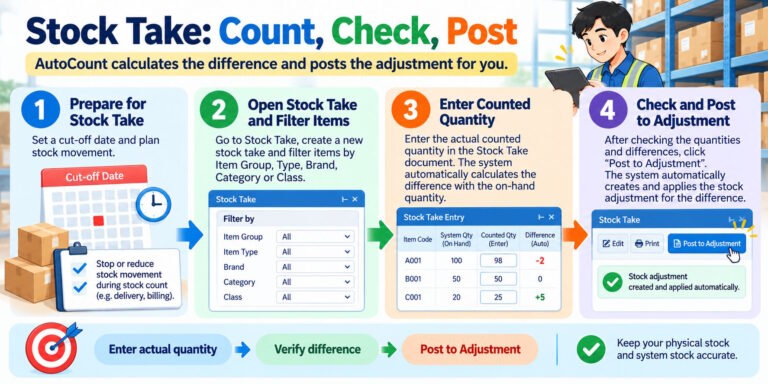
Does your physical stock match the quantity shown in AutoCount?
Stock differences can happen because...
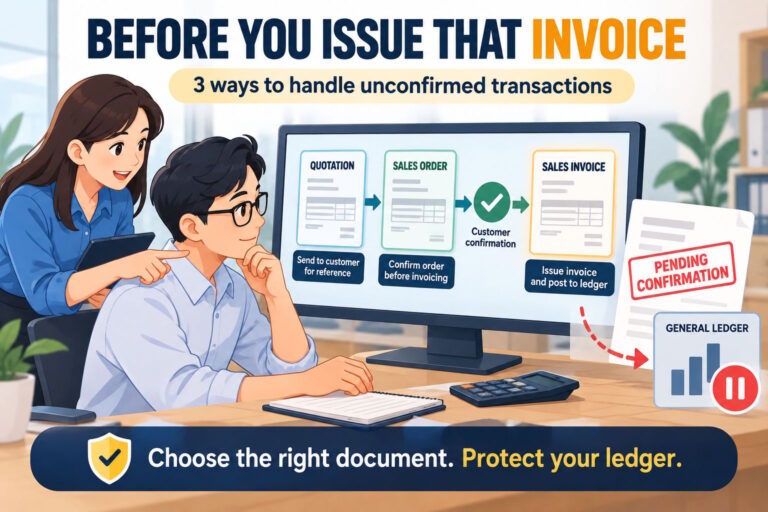
Sometimes, customers ask for an invoice before confirming their purchase. They may need the document...
This release brings a range of enhancements focused on transaction management, e-Invoice submission...
Reconciling bank statements with system records has always been one of the more repetitive tasks...
One of the most significant additions in PalmPOS V1.5.0 is OneSales POS Link to v2 Accounting.
This...